Dreamcode Cloud
Your games. Anywhere.
What if your device doesn't need to run the game?
With Dreamcode Cloud, you can stream supported Dreamcode games directly to your device. The game runs in the cloud, while you play through an internet connection.
Play from a computer, laptop, tablet, or other supported device without installing the native version.
Gaming without the hardware
The game runs in the cloud.
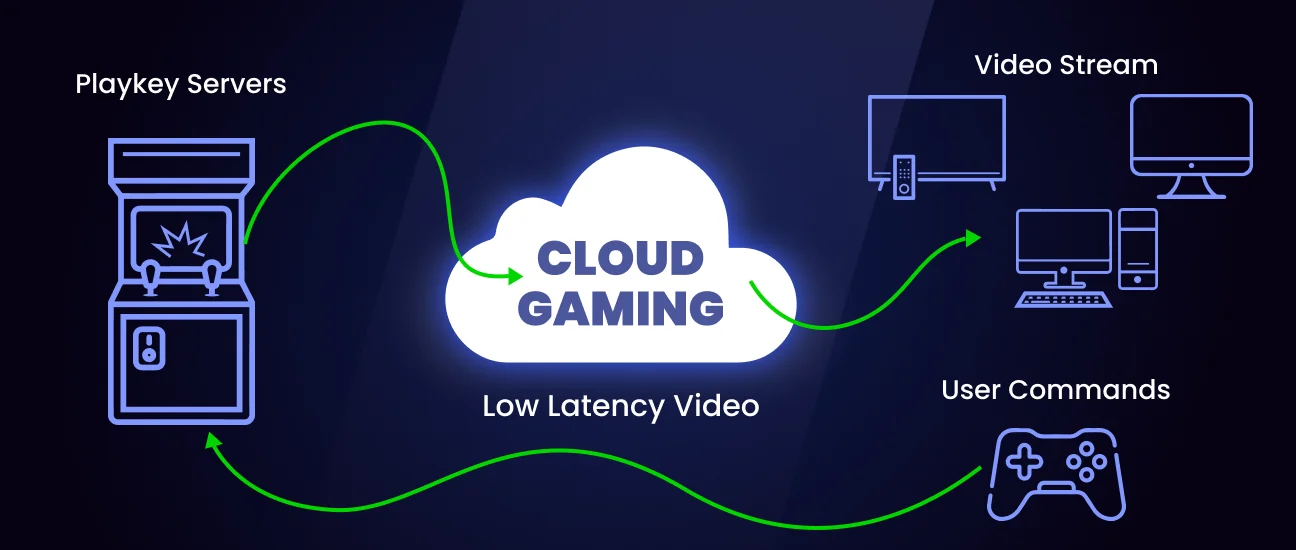
Dreamcode Cloud handles the game itself on remote hardware. Your device receives the video and sends your controls back to the game.
That means you can play supported Dreamcode games even when your device isn't powerful enough to run the native version locally.
Play from almost anywhere
Your Dreamcode games aren't tied to one computer. With Dreamcode Cloud, you can access supported games from compatible devices with a suitable internet connection.
Desktop
Play from your Windows, macOS, or Linux computer without installing the native game.
Laptop
Take your games with you and play without carrying your entire local game library.
Mobile & Tablet
Play supported games from compatible mobile and tablet devices through the browser.
Actual availability and performance depend on the device, browser, network connection, and the individual game.
Two ways to access Dreamcode Cloud
In your browser
Dreamcode Cloud is available directly through:
play.dreamcode-interactive.site
Choose a supported game and start playing. No separate cloud-gaming application is required.
Play in Dreamcode Cloud →Through Dreamcode Hub
Dreamcode Cloud is also integrated into the Dreamcode Hub application.
Open Hub, find a supported game in your library, and launch the cloud version directly from the app.

No powerful PC required
One of the main advantages of cloud gaming is that your local hardware doesn't have to do all the work.
The game runs on Dreamcode's cloud infrastructure while your device handles the streaming experience. This can make supported games accessible on devices that would otherwise struggle to run them locally.
A good connection matters
Cloud gaming depends on your internet connection. For the best experience, we recommend:
- A stable internet connection
- Low network latency
- A modern browser or supported version of Dreamcode Hub
- A reliable Wi-Fi or wired connection
- Sufficient bandwidth for game streaming
Performance can vary depending on your network, location, device, and distance from the available cloud infrastructure.
Cloud Gaming ≠ Cloud Saves
An important distinction
Dreamcode Cloud lets you run games in the cloud. It does not currently provide cloud save synchronization.
Your game running remotely does not mean your save data is automatically synchronized between your devices. For now, save data should be considered local to the game/session unless the individual game explicitly provides another system.
Example
You play a game through Dreamcode Cloud on your laptop.
Later, you open the same game from another device.
Your previous progress will not necessarily be available there.
We're working toward improving the Dreamcode ecosystem, but cloud saves are not currently offered.
Supported Games
Not every Dreamcode game is necessarily available through Dreamcode Cloud.
Games that support cloud gaming will display a Play in Cloud option on their game page and within Dreamcode Hub. As more games become compatible, the list will grow.
Browse Games →Your Library, Your Choice
When a game supports multiple ways to play, you can choose the experience that works best for you.
- Native
Download the game and run it locally. - Browser
Play the supported browser version directly. - Dreamcode Cloud
Stream the game from the cloud without running the game locally.
Ready to play?
Your next game is closer than you think.
Open Dreamcode Cloud and start playing a supported game directly from your browser.
Play with Dreamcode Cloud →Or download Dreamcode Hub for the complete Dreamcode experience.
Download Dreamcode Hub →Dreamcode Cloud
Play more. Install less.